

AtlasPool.io, launched in late 2025, is a solo Bitcoin mining pool built for performance, global accessibility, and high reliability. AtlasPool takes a unique approach in making its service available through a networking technology called BGP Anycast, which announces the service to 100+ worldwide locations.
This means that miners will automatically be routed to the closest entry point into the network, often resulting in reduced latency through a single convenient destination address. It also means that there is no guesswork for miners in selecting a pool closest to their own location. No matter where anyone is in the world, they are routed to the closest AtlasPool location. This easy, reliable feature makes AtlasPool worth a look for your solo mining needs.
In this review, we'll dig into what AtlasPool offers and whether it's the right fit for your solo mining setup.
| DESCRIPTION | DETAILS |
|---|---|
| 💻 Name | AtlasPool |
| 🌐 Website | atlaspool.io (hosted) |
| 🗓 Release year | 2025 |
| 💰 Algos Supported | SHA-256 (Bitcoin-only) |
| 💸 Pool Fees | 1.5% (hosted) |
| 🔒 Security Features | Open source (Ckpool open-source stratum server), Encrypted TLS connection support |
| 💻 Compatibility | Supports all major mining SHA256 ASICs (Bitaxes, Bitforge Nanos, etc.), NiceHash, Braiins Hashpower, MiningRigRentals, Rigly & many more |
| 🔄 Connectivity | Stratum protocol (v1), Stratum Protocol (v1) over TLS |
| 📜 Software License | GPLv3 |
| 📜 Warranty | No Warranty |
How AtlasPool Works
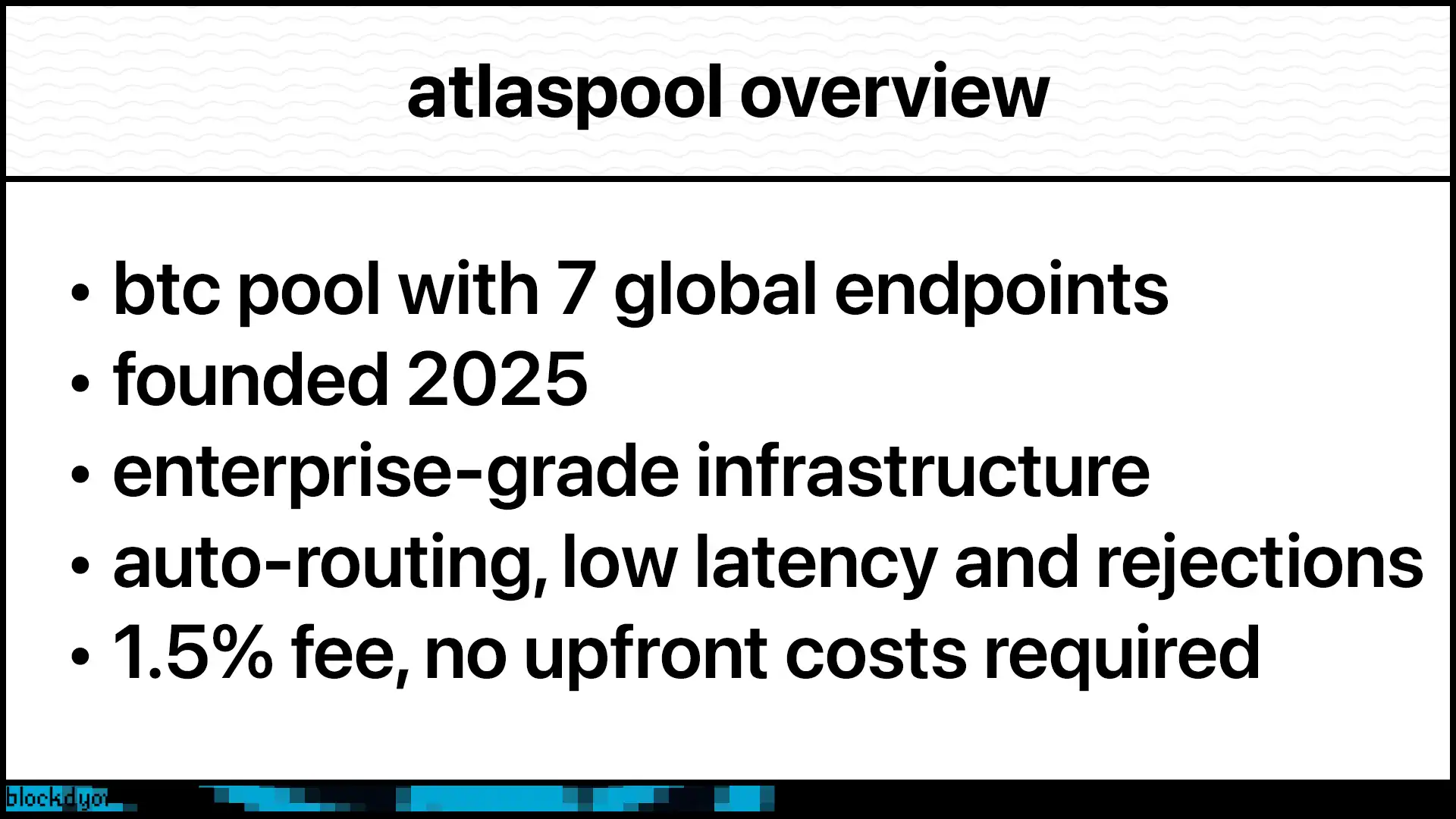
AtlasPool’s clever use of anycast reduces latency and improves availability of the pool. There is no guesswork by the user in trying to find the closest pool to their location. Instead, simply point your miner to solo.atlaspool.io:3333 and let anycast do the work for you. Your miner will be routed to the closest Edge location (100+ worldwide) and from there be routed to one of seven endpoint destinations.
AtlasPool endpoints are currently deployed at:
- North America: Ashburn, VA (US) and Portland, OR (US)
- South America: São Paulo (BR)
- Europe: Frankfurt (DE)
- Asia: Hong Kong (HK) and Mumbai (IN)
- Australia: Sydney (AU)
As demand grows, AtlasPool promises to deploy more endpoints worldwide.
An added benefit of anycast is improved reliability. If any endpoint ever experiences a problem, then it is withdrawn from the pool and miners will automatically reconnect to the next closest healthy endpoint.
Under the hood, AtlasPool runs Ckpool, a reliable open-source stratum v1 server. Each endpoint also runs their own local bitcoin node, which are well connected to Mainnet for fast block propagation.
AtlasPool Features
Global Infrastructure The standout feature for AtlasPool is its global deployment. Seven endpoints across multiple continents mean you're never far from a server. This matters more than you might think. Higher latency is a factor that can raise rejected shares on your miners. Rejected shares are wasted work to be avoided.
Exceptional Uptime AtlasPool's distributed architecture delivers near-perfect uptime. While single-server pools often experience hours of weekly downtime, sometimes without disclosure, AtlasPool's redundant infrastructure ensures you're always mining. It's virtually impossible for all servers to go down simultaneously, meaning your miners stay connected and productive 24/7 regardless of regional issues.
Near Real-Time Monitoring AtlasPool provides a dashboard where you can track your workers and associated hashrates per device. The pool also tracks your best share per device and best share submitted to the pool. It even alerts you on the web site when a worker finds a new best share.
Worker Identification You can append unique worker names to your wallet address. For example, wallet_address.worker1 and wallet_address.worker2. This lets you monitor each device individually instead of seeing combined stats.
TLS Support For devices that support TLS, AtlasPool offers TLS 1.3 support on port 4333. Standard unencrypted connections are available on port 3333.
Fault Tolerance The redundant infrastructure design means high availability. Multiple servers and automatic failover keep your miners connected even if one location experiences issues.
Transparent Statistics Everything is visible. You see exactly what your miners are doing.
High Difficulty Port AtlasPool offers port 4334 for high hashrate rentals that require higher starting difficulty. The port starts at 1M difficulty and adjusts upwards if needed. The pool is tested and compatible with both NiceHash and MiningRigRentals.
How To Get Started With AtlasPool
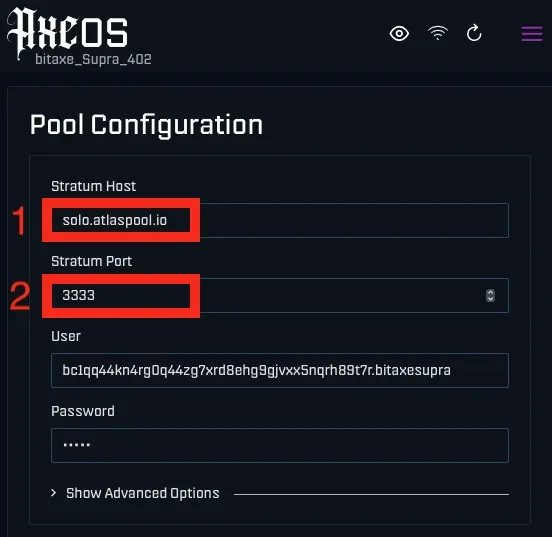
To get started with AtlasPool, open your mining pool settings and enter:
solo.atlaspool.io3333Save, restart and once connected, you'll automatically route to the nearest server with the lowest latency. No manual selection needed.
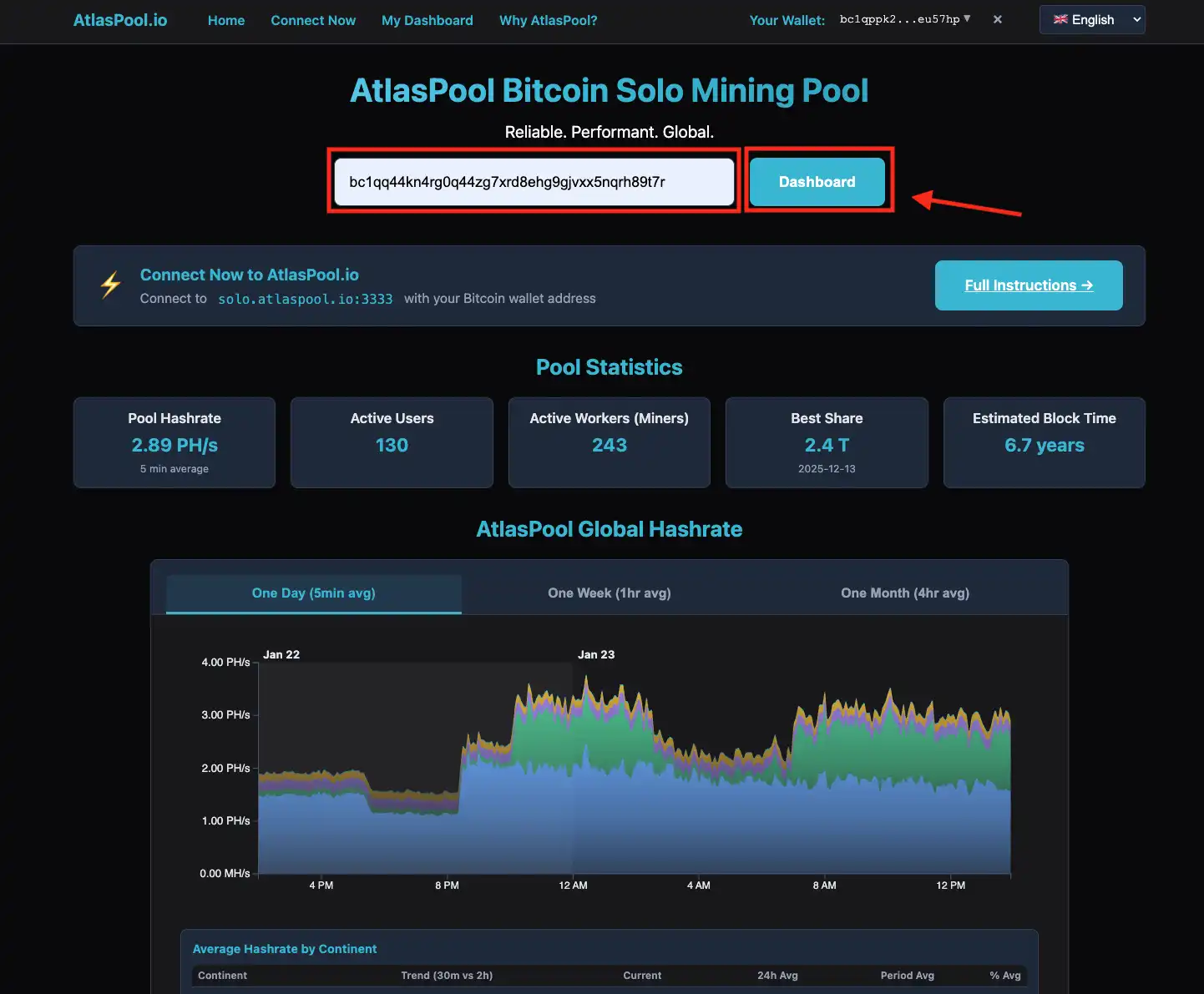
Next, head to Atlaspool.io and enter your bitcoin address in the search field at the top. Click on dashboard to view your workers' stats.
AtlasPool Dashboard
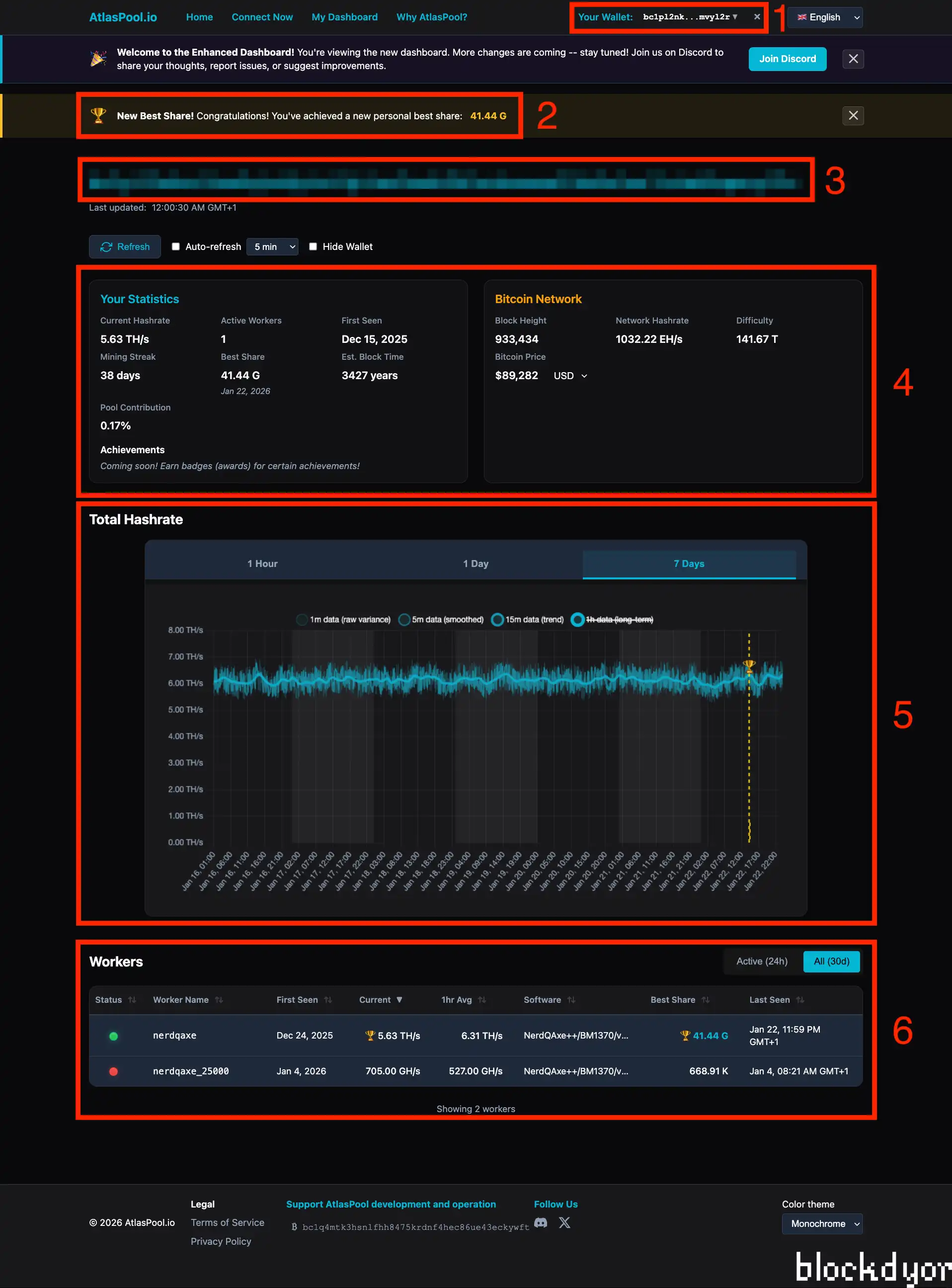
The AtlasPool dashboard is well organized and comprehensive. At the top, you'll find your wallet selector (1), new best share (2) and bitcoin address (3), a refresh section that updates as frequently as every two minutes, and an option to hide your wallet from public view - great for taking screenshots and sharing with others.
The statistics section (4) shows real-time hashrate, mining streak, pool contribution, active workers, best share, first seen date, estimated block time, and achievements for some added gamification (to be released in early 2026).
Bitcoin network stats are also displayed. Block height, network hashrate, difficulty, and bitcoin price are all visible at a glance.
Below that, you'll find a graph showing your total hashrate across multiple timeframes (5). The graph includes a marker for any recent best share found by and of your miners. The workers' view gets quite detailed too (6). It includes software information, hashrate averages, worker names, status, and more for each connected device.
How does AtlasPool Compare to Other Pools?
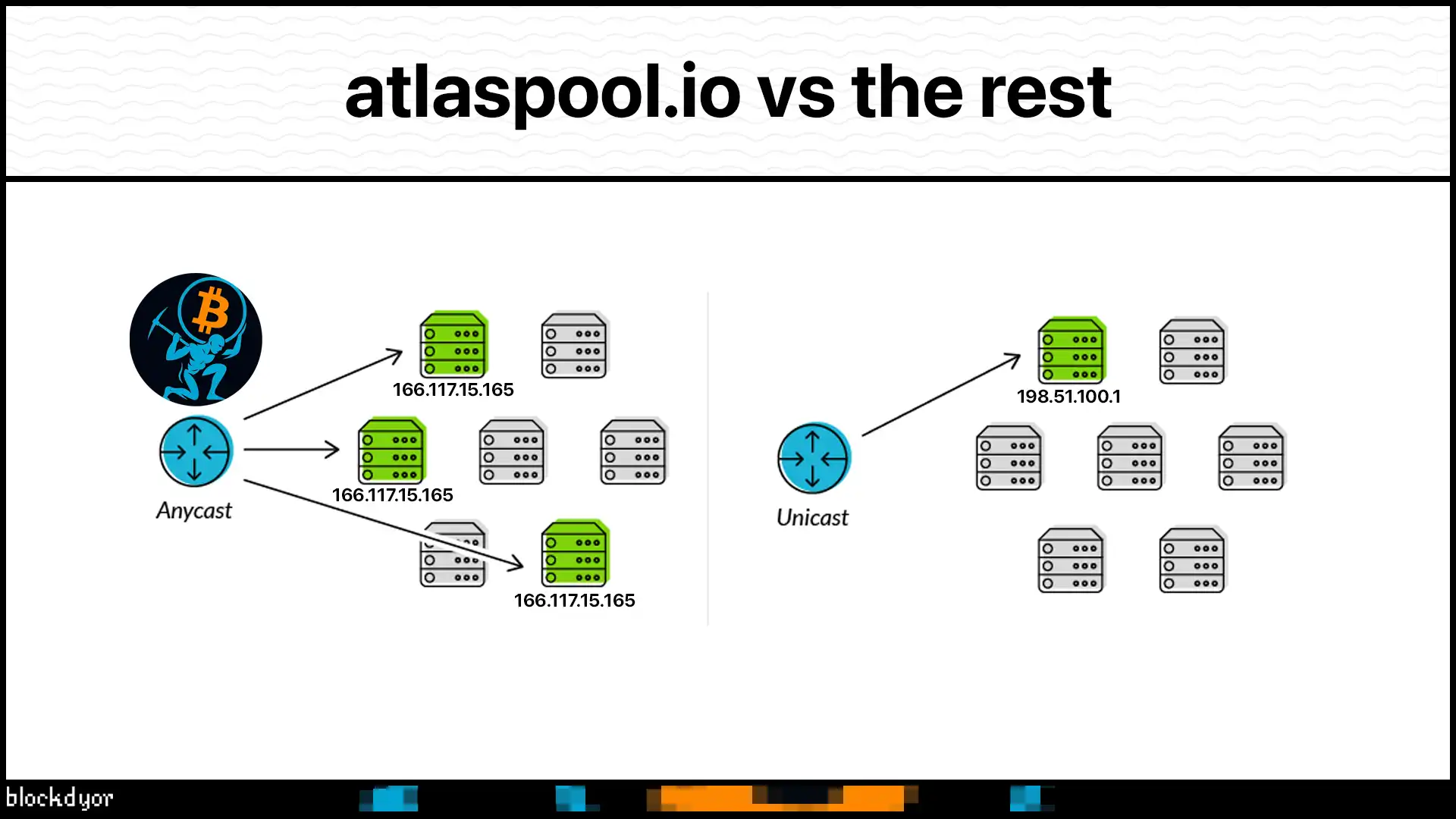
AtlasPool has set an incredibly high bar considering how new they are. The technical expertise on display here is impressive: an anycast network architecture, highly scalable, super-low downtime, and a global deployment that supports users around the world. The pool’s focus on performance and availability should make even seasoned Bitcoin miners take note.
Many hosted solo mining pools run a single server. If you're geographically distant from that server, you deal with higher latency. High latency can lead to an increase in rejected shares. Rejected shares are work your miner completed most often after a block was already found. All miners should try to reduce rejected share percentages as much as possible.
AtlasPool's focus on reducing latency means that miners are typically connected to the closest geographic endpoint. For example, miners in Australia will connect to Sydney while other miners Europe will connect to Frankfurt, Germany.
Let's talk numbers. A 0.5% rejection rate means you lose 3.6 hours of work per month. At 1%, you're losing 7.2 hours monthly. That's real money. AtlasPool's infrastructure aims to keep rejections as close to 0% as possible (although 0% rejection rate is practically impossible).
They even challenge you to test it yourself. Note your current pool's rejection rate over 24 hours. Switch to AtlasPool for 24 to 48 hours. Compare both the latency and rejected share percentages shown in the miner’s dashboard. Most miners see improvement due to lower latency. For those who use NerdQAxe++, you can do a 50/50 pool split between AtlasPool and another pool. This method of testing allows you to simultaneously compare results from both pools.
That said, running your own node gives you complete control and sovereignty. If you have the technical skills and resources, a self-hosted setup is hard to beat. But it requires upfront investment, ongoing maintenance, and technical knowledge. AtlasPool targets miners who want solo mining benefits without operational overhead.
Remember that AtlasPool is a solo pool. Similar to Ckpool and Public Pool, you only receive Bitcoin if you find an actual block. AtlasPool is not a variance-smoothing pool like PPLNS or PPS. No sharing, no steady payouts. Pure lottery mining.
AtlasPool Fees
The fee structure is straightforward. There's no upfront cost to use AtlasPool. You don't pay to connect or maintain your account.
If you find a block, AtlasPool keeps 1.5% of the block reward and you keep the remaining 98.5%. The 1.5% fee covers the cost of operating a global infrastructure, development efforts, and ongoing maintenance.
For context, some solo pools charge 2% or more. Others offer 0% but lack geographic distribution or reliability features. The 1.5% fee is competitive while delivering an enterprise-grade Bitcoin pool.
The fee only applies when you actually find a block. Until then, you're mining at no cost. This aligns incentives. The pool shares in the reward only when you succeed.
AtlasPool Hashrate
AtlasPool sets a default difficulty of 2,000. This creates a minimum hashrate requirement. Only miners with 400 GH/s or higher (Bitaxe Supra or better) should connect.
Devices such as Nerdminers do not have sufficient hashrate to properly register with the site. This isn't a limitation for serious solo miners, but it's worth noting if you're testing with small hardware.
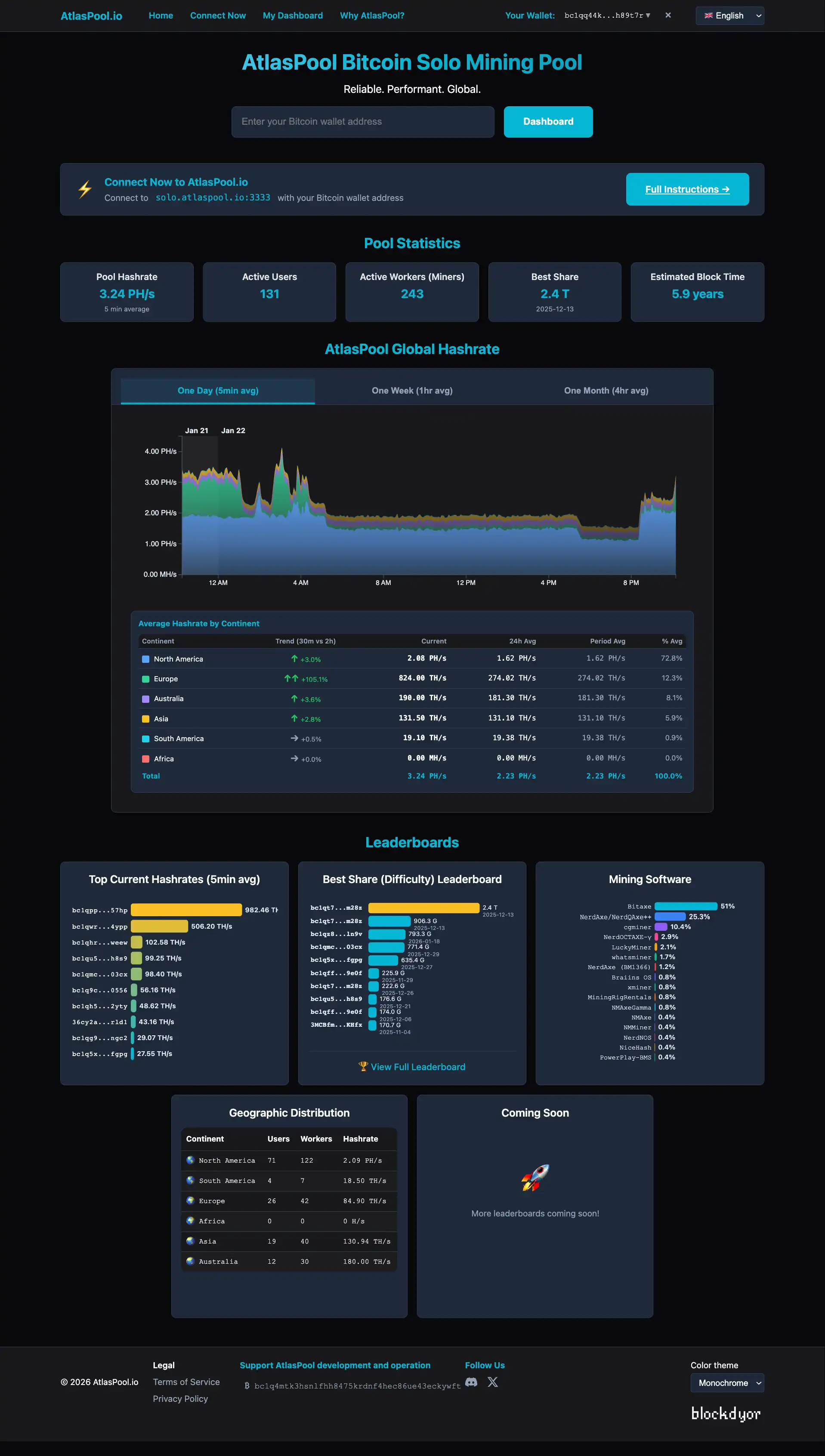
The pool publishes total network statistics in an elegant and detailed way directly on the home page. You can find comprehensive information about AtlasPool's global activity, including:
- Global Hashrate: Total combined hashrate across all connected miners
- Top Current Hashrates: Real-time view of the highest performing miners on the network
- Best Share: The closest any miner has come to finding a block. The pool offers a leaderboard of the top 250 Best Shares ever, with filtering capabilities for geographic location, miner type, and the hash rate of the miner at the moment when the Best Share was recorded.
- Mining Software: Breakdown of what software miners are using
- Geographic Distribution: Visual representation of where miners are connecting from worldwide, showing the effectiveness of their multi-continent infrastructure
This transparency gives you insight not just into your own operation, but into the entire pool's activity and performance.
AtlasPool Speed Test
The AtlasPool team created a dedicated speed testing tool that shows just how serious they are about mining performance. It's a cross-platform Python application designed to help solo miners identify the fastest public stratum server from their location.
How It Works
The script runs two concurrent tests for each pool:
- PING TEST - Measures basic network latency using ICMP
- STRATUM HANDSHAKE - Measures complete connection time including the mining.subscribe protocol handshake (this reflects what your miner actually experiences)
All servers are tested simultaneously, delivering results in approximately 5 to 10 seconds total.
Installation
Clone the repository and make it executable:
git clone https://github.com/mweinberg/stratum-speed-test.git
cd stratum-speed-test
chmod +x stratum_test.py  # Linux/macOS only
Usage
Run a quick test of all preconfigured pools with one run each:
python3 stratum_test.py # or just 'python' on some systems
This tool demonstrates AtlasPool's commitment to transparency and performance optimization. Rather than just claiming low latency, they provide miners with the means to verify it themselves.
AtlasPool Pros & Cons
| Pros | Cons |
|---|---|
| ✅ Low latency regardless of location due to global server distribution | ❌ 2,000 default difficulty requires 400+ GH/s minimum hashrate |
| ✅ Automatic routing to nearest endpoint via BGP Anycast | ❌ 1.5% fee is higher than some competitors |
| ✅ No upfront costs or ongoing fees until you find a block | |
| ✅ High availability through redundant infrastructure | |
| ✅ TLS encryption option for secure connections | |
| ✅ Real-time monitoring and transparent statistics | |
| ✅ Built on reliable ckpool open-source software |
AtlasPool Alternatives
In the hosted Bitcoin solo mining space, the choices are definitely many. For brevity, I'll cover the two most well known: CkPool and Public Pool.
| Feature | AtlasPool | CkPool | Public Pool |
|---|---|---|---|
| Fee | 1.5% | 2% | 0% |
| Server Locations | 100+ network entry points, 7 global endpoints | 3 (USA, Europe, Australia) | 1 (Centralized) |
| Latency Optimization | BGP Anycast routing | Single location | Single location |
| Redundancy | High (automatic failover) | Single server | Single server |
| TLS Support | Yes (port 4333) | Yes | Yes |
| Minimum Hashrate | 400 GH/s | No minimum | No minimum |
| Dashboard | Comprehensive stats | Basic stats | Basic stats |
| Software | ckpool variant | ckpool | Custom |
| Uptime | High (multi-server) | Very reliable | Reliable |
| Best For | Global miners needing low latency | US/EU/AUS miners, low fee preference | Zero fee preference |
CkPool (solo.ckpool.org) CkPool is the original and longest-running solo mining pool. It's maintained by Con Kolivas, the developer of the ckpool software that many pools (including AtlasPool) use. The pool has a proven track record and charges a 2% fee on found blocks. However, it operates from three locations: USA, Europe and Australia. These means miners outside those regions can experience higher latency. The interface is minimal and functional, focusing purely on mining without extra features.
Public Pool (public-pool.io) Public Pool offers a 0% fee structure for their hosted service (it's possible also to self host the pool thanks to the Umbrel app), making it attractive for miners who want to keep the entire block reward. It provides a clean, modern interface with good statistics tracking. Like CkPool, it operates from a centralized location (USA) rather than a distributed infrastructure. This means latency varies significantly based on where you're mining from. The 0% fee is compelling, but you sacrifice the redundancy and geographic optimization that comes with a global deployment.
Bottom Line
AtlasPool’s focus on global availability, reliability, and performance sets it apart from many other solo mining pools. By distributing its infrastructure worldwide, it brings the pool service closer to most users. An added benefit can be reduced rejected shares, which is to be avoided by all solo miners. Even a 0.1% reduction in rejected shares recovers 8.8 hours of wasted compute time per device.
The 1.5% fee is reasonable given what you're getting. Seven endpoints across continents, automatic routing, redundant infrastructure, and professional reliability don't come free. The fee structure only charges you when you succeed, which is fair.
If you're serious about solo mining and want professional infrastructure without running your own node, AtlasPool deserves your consideration. The automatic routing means you don't need to manually select servers or worry about connection quality. It just works.
Is it perfect? No. The 2,000 difficulty means smaller devices can't participate. Some miners might prefer a 0% fee pool no matter the feature set. And if you have the skills and resources, running your own node still offers maximum control.
But for most solo miners who want low latency, high reliability, and hassle-free operation, AtlasPool delivers. Test it yourself. Point your miners at solo.atlaspool.io:3333 for a couple days and compare latency and rejection rates to other pools. The proof is in your own data.

AtlasPool Evaluation
With a solid performance in infrastructure and reliability, AtlasPool stands out as a technically sophisticated option for solo Bitcoin mining. It combines enterprise-grade global infrastructure with competitive commissions (in case of block found), offering professional-level performance for miners who want low latency without running their own nodes.
Performance: AtlasPool delivers exceptional performance through its globally distributed architecture. Seven endpoints across continents eliminate geographic bottlenecks that plague single-server pools. BGP Anycast routing automatically connects you to the nearest server, minimizing latency and reducing rejected shares. The fault-tolerant design with automatic failover ensures your miners stay connected even during server issues. Built on reliable ckpool software with well-connected bitcoin nodes, the pool offers fast block propagation and reduced orphan rates.
Ease of Use: AtlasPool balances technical sophistication with straightforward operation. Setup requires basic mining knowledge, but the automatic routing means you don't need to manually select servers or configure complex settings. Simply point your miner at solo.atlaspool.io and the infrastructure handles the rest. The dashboard provides comprehensive real-time statistics, worker tracking, and performance metrics in a clean interface. While the 2,000 default difficulty means you need 400+ GH/s minimum hashrate, this aligns with serious solo mining operations.
Transparency: AtlasPool publishes detailed network statistics directly on the homepage, including global hashrate, top performers, best shares, mining software distribution, and geographic coverage. The dashboard offers full visibility into your operation with no hidden metrics. Individual worker tracking, achievement gamification, and Bitcoin network stats are all readily accessible. The open approach to data and use of open-source ckpool software demonstrates commitment to transparency.
Reputation: As a relatively new entrant to the solo mining space, AtlasPool has quickly established credibility through technical excellence. The enterprise-level infrastructure and network engineering expertise are evident in the execution. While it lacks the years-long track record of pools like CkPool, the professional deployment and reliable operation speak to serious technical capability and commitment to the space.
Cost: AtlasPool charges no upfront fees or ongoing costs. The 1.5% fee only applies when you successfully find a block, taking 98.5% of the reward. This fee structure aligns incentives since the pool only earns when you succeed. While higher than CkPool's 0.5% or Public Pool's 0%, the fee supports real operational costs for maintaining seven global endpoints, redundant infrastructure, and professional reliability. For miners far from traditional pool locations, the latency reduction and lower rejected shares likely offset the higher fee through improved efficiency.